

Blog
Is Your Lovable App Leaking API Keys? That's the Wrong Question
The key in your bundle is supposed to be public. Here's the 60-second check that actually tells you whether your database is open — plus the checks that don't, and the popular advice that's now out of date.
Raja Hussnain
Founder of DevCrew, a full-stack studio that makes AI-built apps production-ready. 4 years shipping production code for startups across fintech, edtech, and SaaS. LinkedIn
Published August 24, 2026Last updated August 24, 2026
Open your Lovable app right now, press F12, and search the JavaScript for eyJ. You'll find a key. It's been sitting there since the day you launched, visible to every single visitor.
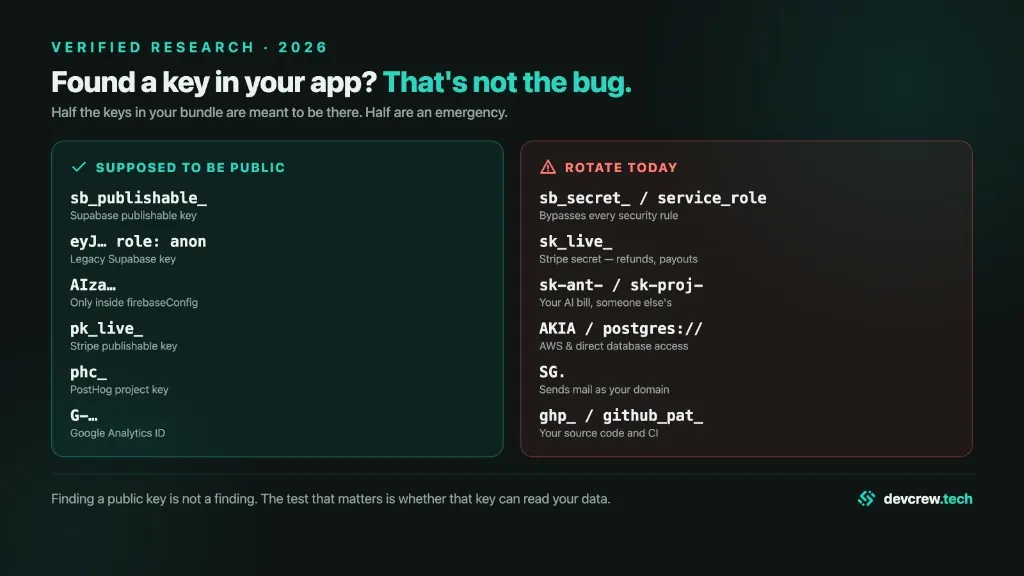
Almost every guide on the internet will tell you this is a five-alarm fire. It isn't. That key is supposed to be public — Supabase's own documentation describes it as "safe to expose online: web page, mobile or desktop app… source code."
Which is why the question everyone asks — is my app leaking API keys? — is the wrong one. It sends founders hunting for something that's meant to be there while the actual hole goes unchecked.
The right question takes about sixty seconds to answer: can a stranger read your database?
Why the public key isn't the problem (and when it becomes one)
The key in your bundle isn't a lock. It's a name tag. It tells Supabase who's asking — an anonymous visitor — and nothing more.
The actual lock is a database setting called Row Level Security. Supabase is blunt about what happens without it: "A table in an exposed schema without RLS is readable and writable by any role with a grant on it."
So the anon key is not "safe." It's safety-neutral. It's harmless only because a second, entirely separate thing is doing the real work. AI builders generate the name tag reliably and the lock unreliably.
This is not a theoretical concern. It has a CVE — CVE-2025-48757, CVSS 9.3 — issued against Lovable for generating apps whose databases allowed "remote unauthenticated attackers to read or write to arbitrary database tables." The researchers scanned 1,645 Lovable apps and found 170 of them leaking. Not because keys were stolen. Because the lock was never installed.
This is the practical companion to Why Vibe-Coded Apps Die in Production — same failure mode, the check you can run before lunch.
The mechanism nobody mentions
Here's the part I haven't seen written down anywhere, and it explains every statistic in this post.
Tables created through the Supabase dashboard get Row Level Security enabled by default. Tables created by a migration file, the SQL editor, or an ORM don't — unless the migration explicitly enables it. There's an ensure_rls trigger that would close the gap globally, but it's opt-in and buried under Authentication settings.
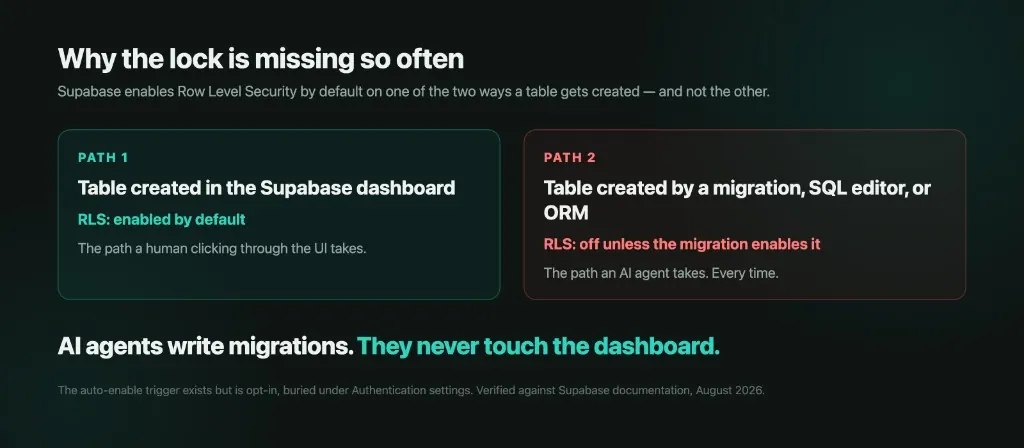
AI agents write migrations. They never click through the dashboard table editor.
The one path that's safe by default is the one path vibe coding doesn't use.
The 60-second check
Run this on your own app only — see the legal note at the end, it matters more than you'd think.
- Step 1. Open your live app in Chrome, press F12, click Network, reload the page.
- Step 2. Find a request going to something like
https://abcdxyz.supabase.co/rest/v1/.... Copy two things: that project URL, and theapikeyvalue from the request headers. Also note the table names — they're right there in the request paths. - Step 3. Open the Console tab and paste this, substituting your project, key, and one table name:
fetch("https://YOURPROJECT.supabase.co/rest/v1/YOURTABLE?select=*", {
  headers: { apikey: "YOUR_ANON_KEY", Authorization: "Bearer YOUR_ANON_KEY" }
}).then(r => r.json()).then(console.log)
Step 4. Read the result.
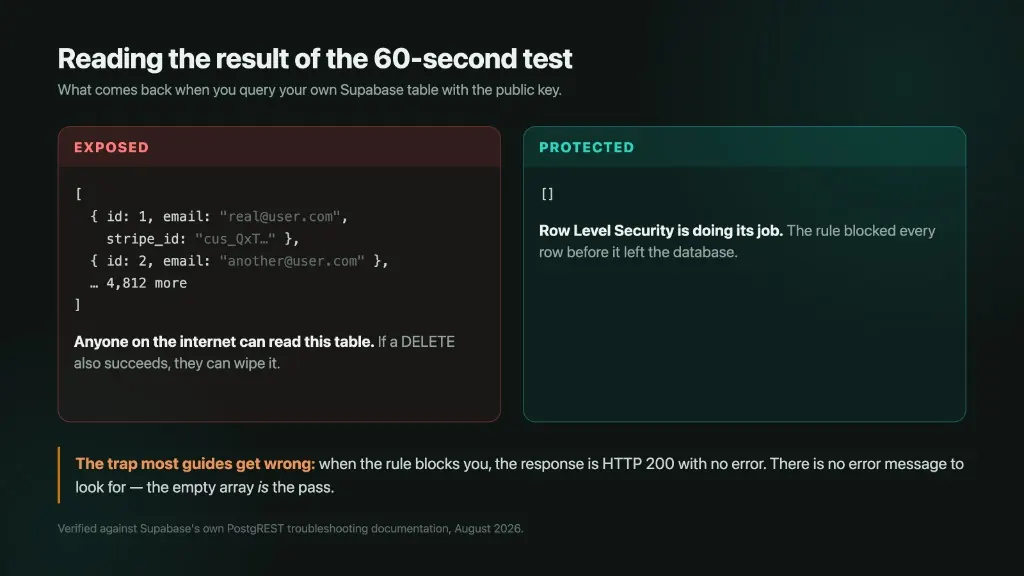
Rows come back? Anyone on the internet can read that table. If a write or delete against that same table also succeeds, strangers can change or wipe your data.
An empty array []? You're fine.
This is where most guides get it wrong. When Row Level Security blocks you, PostgREST returns HTTP 200 with no error message at all. There's no red text, no "permission denied," nothing to look for. The empty array is the pass. If you're waiting for an error to tell you you're safe, you'll wait forever and conclude the wrong thing.
The no-guessing version
If you'd rather not touch a console: log into the Supabase dashboard, open your project, go to Advisors → Security Advisor. It's free on every project and it lists your tables with plain-English warnings. The one to look for is rls_disabled_in_public, described as: "Anyone with your project URL can read, edit, and delete all data in this table."
One catch — the Advisor is a linter, not a tester. A table with RLS switched on and a policy of USING (true) passes clean while being completely open. That's the exact gap that made Lovable's own security scanner inadequate: it checked whether a policy existed, not whether it worked.
Run both. Neither substitutes for the other.
Now check for the keys that genuinely shouldn't be there
With the database question answered, the bundle scan is worth two minutes.
Press Ctrl+Shift+F (Mac: Cmd+Option+F) on your live app. That opens DevTools' search across all loaded files — right-click "View Source" only shows an empty shell on these frameworks.
Search for these. Any hit is an emergency:
sb_secret_ · service_role · sk_live_ · sk-ant- · sk-proj- · AKIA · SG. · ghp_ · postgres://
A better needle for OpenAI keys than sk-: search T3BlbkFJ. That's base64 for "OpenAI" and it sits inside every modern OpenAI key.
Two traps here. The search only covers files that have loaded — click through your whole app first, or lazily-loaded pages stay invisible. And it doesn't search network responses, so a key returned by your own API won't show up.
The eyJ decision, in ten seconds
If you find a long string starting eyJ, that's a JWT — and JWTs are signed, not encrypted, so anyone can read the contents without any key at all. You just need to know which one you've got.
Don't paste it into jwt.io or any other website. Copy the middle section (between the two dots) and run this in the Console — it never leaves your browser:
JSON.parse(atob("PASTE_MIDDLE_SECTION_HERE")){role: "anon"} is expected. {role: "service_role"} is an emergency — that role carries Postgres's BYPASSRLS attribute, meaning every security policy you wrote is skipped entirely.
Faster still: just Ctrl-F the key itself for c2VydmljZV9yb2xl. That's the base64 fragment service_role produces. If it's in there, you have a disaster in your bundle.
Don't trust the browser block. Supabase returns a 401 when a secret key is used from a browser — but it detects browsers by reading the User-Agent header, which any attacker controls. A request that doesn't look like a browser walks straight past it. A leaked secret key is fully exploitable despite that 401.
Advice that's now out of date
Three things you'll read elsewhere that are wrong in 2026:
- "List all your tables via the OpenAPI spec." Dead. Supabase removed anonymous access to
/rest/v1/on 11 March 2026 for new projects and 8 April 2026 for existing ones. Read table names off your Network tab instead. - "Check if yoursite.com/.env loads." Nearly always a false alarm. These are single-page-app hosts that serve
index.htmlfor any unknown path, so a 200 is usually just your homepage. Judge the content-type and the body, never the status code. A real leak istext/plainwithKEY=valuelines. That said, one genuine exception: Vercel's default ignored-files list doesn't include plain.envor.env.production, and it only applies to CLI deploys — Git-based deploys get no filter at all. Worth actually checking there. - "Firebase is locked down by default, so you're fine." Half true. Firestore and Realtime Database default to deny-all. Cloud Storage doesn't — Firebase's docs state that by default "only authenticated users can read or write data." That's
if request.auth != null, and with anonymous auth or open signup, "authenticated" means anyone who taps a button. Firebase's own guide lists authentication-only checks as an anti-pattern, while shipping one as a default.
The channels a clean bundle scan still misses
- Source maps. In DevTools → Sources, if you see readable
.tsxfiles instead of minified soup, you shipped your source code. Watch for Vite's'hidden'mode — it strips the reference so DevTools won't load the map, but fetching/assets/index-hash.js.mapdirectly still works. - Next.js server-rendered payloads. Anything a Server Component passes to a Client Component gets serialized into the HTML. "It's server-side" stops being true the moment a value crosses that boundary. The classic kill shot is
SUPABASE_SERVICE_ROLE_KEYrenamed toNEXT_PUBLIC_…to make an error go away. Check with:
curl -s https://yoursite.com/ | grep -iE 'sk_|secret|token|key'AI agent config files. This is the newest one. Attackers now probe for /.claude/mcp.json, /.cursor/mcp.json, and /.claude/.credentials.json. Meanwhile a campaign tracked as "Bissa" has been scanning millions of Next.js endpoints since September 2025 specifically to harvest AI provider keys — so that someone else's usage lands on your bill and under your name.
If you find something
Rotate first, then delete. Removing a key from your code does not revoke it — it lives on in git history, in cached bundles, and on the CDN.
The urgency is real. In a controlled 2026 experiment, planted AWS keys got their first outside hit in six minutes, median eight. And 38 of 139 recorded uses happened after the repository was made private again. Reverting doesn't help.
Nor does waiting help: 88% of leaked AWS keys still authenticate, and the median live leaked key has been valid for five years. Only 13.7% are ever rotated.
If it's an LLM or cloud key, set a billing cap today — and know its limits. In February 2026 a three-person startup was billed $82,314 in 48 hours against a normal spend of $180/month. Google's quota tiers escalate automatically as spend rises, so the attacker's own usage promoted the account past its cap. The refund was refused.
One thing before you go scanning
Everything above is for your own app, where you're the person who can grant authorization.
Running these checks against someone else's app is a different thing entirely, and "the data came back without a login" is not a defense. Supabase says so explicitly: "Do not run automated scanners on other customer projects… Do NOT attack projects of other customers." Lovable's disclosure program puts third-party user apps out of scope. Nobody can consent on an app owner's behalf.
Worth knowing: even the famous CVE-2025-48757 research went further than most people realize — it wrote a "payment_status": "paid" record into a live third-party app and published real user emails. NVD lists the CVE as disputed. It surfaced a genuine problem; it's not a template to copy.
The one sentence
A clean bundle scan doesn't mean you're safe. Your anon key and your Firebase apiKey are supposed to be public. The real test is whether a stranger can read your database — run that one first.
The 60-second check answers the database question. The full audit we run covers 25 — including payment-flow abuse, rate limiting, backup recovery, and the checks specific to Lovable, Bolt, and Cursor output. Get the 25-Point Vibe-Code Production Checklist (PDF) → (free, sent to your email)
FAQ
The publishable key (sb_publishable_…) and the legacy anon JWT (eyJ… with role anon) are supposed to be in the client bundle. Supabase documents them as safe to expose. The emergency is a secret or service_role key in that same bundle — or an anon key that can actually read your tables because Row Level Security is off.
From your live app, copy the project URL and anon key from the Network tab, then query one of your tables with that key. If real rows come back, anyone on the internet can read that table. If you get an empty array with HTTP 200, Row Level Security blocked the rows — that empty array is the pass, not an error.
The Advisor is a linter, not a tester. A table with RLS switched on and a policy of USING (true) passes clean while being completely open. That is the same gap that made Lovable's own security scanner inadequate after CVE-2025-48757: it checked whether a policy existed, not whether it worked. Run the live query as well.
No. These checks are only for an app you own. Supabase says not to run automated scanners on other customer projects. Lovable's disclosure program puts third-party user apps out of scope. Empty results without a login are not authorization to keep looking.
Sources
- Supabase — Understanding API keys
- Supabase — Row Level Security
- Supabase — Database Advisors
- Supabase — Removing OpenAPI spec access via the anon key — 11 March 2026 new projects, 8 April 2026 existing
- CVE-2025-48757 — Lovable RLS — CVSS 9.3, NVD status: disputed
- Matt Palmer, original CVE-2025-48757 disclosure
- Symbiotic Security, scan of 1,072 vibe-coded apps — June 2026
- Wiz Research, Moltbook database exposure — February 2026
- Truffle Security, leaked corporate AWS keys — August 2026
- The Register, $82,314 Gemini API key charge — March 2026
- Firebase — Using API keys in Firebase
- Firebase — Avoid insecure rules
- SANS Internet Storm Center, AI agent config probing — July 2026