

Blog
Three Questions to Ask Before You Scale an AI-Built App
The runaway bills of 2026 came from apps with no users. What the evidence says to check before you grow — on cost, on your database, and on whether you can still change anything safely.
Raja Hussnain
Founder of DevCrew, a full-stack studio that makes AI-built apps production-ready. 4 years shipping production code for startups across fintech, edtech, and SaaS. LinkedIn
Published September 1, 2026Last updated September 1, 2026
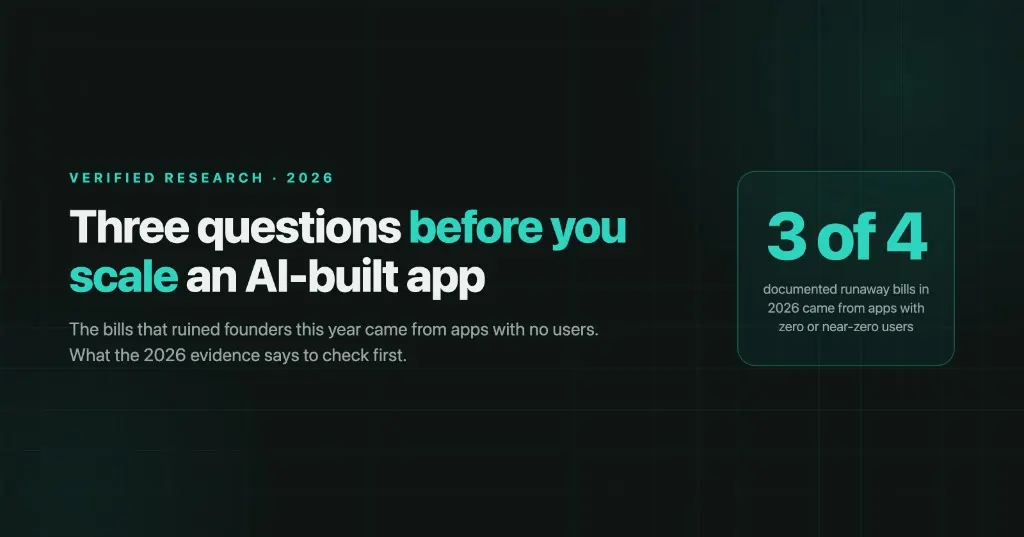
The bills that ruined founders this year came from apps with no users.
$34,895 on Cloudflare, from a loop in agent-written code calling itself — around 930 billion database row reads a day, pre-launch, zero customers. $400 in a single hour on a side project. $4,676 over six weeks with no traffic at all, after an AI CLI recommended a config change and described it in the commit message as "60% cost savings."
Three of the four documented runaway bills in 2026 involved zero or near-zero users.
That breaks the story everyone tells about scaling, which is that success is what gets expensive. It isn't. So when someone asks whether their app is ready to grow, I've stopped asking about traffic and started asking three other things.
Question 1: What does one more user cost you — and does that get better at 10×?
For almost every other kind of software, the answer is yes. You have fixed costs and you spread them across more customers, so margin improves as you grow. That assumption is baked so deep into how founders think about SaaS that most people never check whether it still holds.
For an app that calls an AI model, it doesn't.
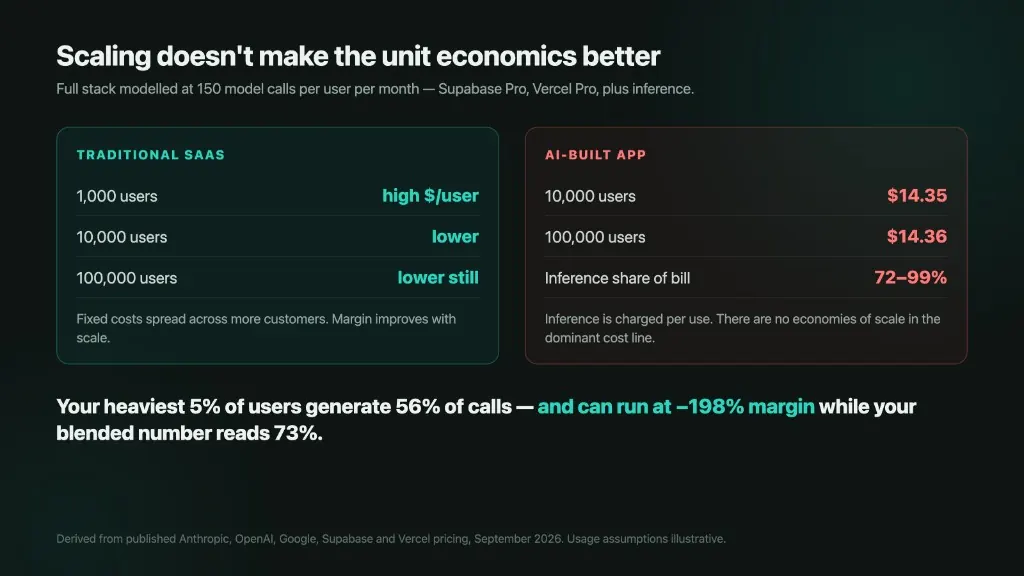
Model the full stack — database, hosting, and inference — at a realistic 150 model calls per user per month, and inference comes out at 72 to 99 percent of total infrastructure spend. Everything else is a rounding error. Founders agonise over Vercel versus Netlify while a single model-choice decision moves the total by 39×.
And because inference is charged per use, cost per user is flat: $14.35 at ten thousand users, $14.36 at a hundred thousand. There are no economies of scale in the line item that dominates your bill.
Then look at your heaviest users, not your average
Take a thousand paying customers in a normal usage spread — most light, some regular, a few heavy. The heaviest 5% generate more than half of all calls.
On a $20 plan running Claude Sonnet, that cohort looks like this: light users at 94% gross margin, regular users at 70%, and power users at negative 198%. Your blended number reads a comfortable 73%.
The average is hiding the loss. And it gets worse as the product improves, because engagement rises while the price stays the same. Same product, same $20, three stages of maturity: 93% margin at launch when usage is novelty-driven, 73% once people form a habit, and negative 23% once you ship agentic features.
Success is the failure mode.
The practical part
Set a hard spend cap at the model provider. That's not generic advice — it's the one place in your stack where a real ceiling exists. Anthropic and OpenAI both enforce hard limits and return an error when you hit them. Vercel's spend setting doesn't stop anything unless you explicitly enable pausing. Firebase's documentation says it outright: budgets "do not cap your usage or charges."
And the mechanism behind those zero-user bills is worth understanding, because it's specific. One founder's Durable Object alarm entered an infinite loop calling Cloudflare's Workers AI binding. Nothing alerted him — Cloudflare's usage notifications monitor CPU time, not the metric that was running away. His summary: "There was no way to set rate limits for AI binding in workers, and I didn't get any notification."
The detail I keep coming back to: Cloudflare's safe product, the AI Gateway that supports spend limits, is harder to authenticate against than the unsafe raw binding. So coding agents reach for the unsafe one by default. That's the causal link between AI-assisted development and an uncapped bill, and it's documented first-hand rather than theorised.
Question 2: What happens to your database when the security fix meets real traffic?
Everything I've written about vibe-coded apps for the last few months comes back to Row Level Security — the database rule that stops one customer reading another's data. It's the thing AI builders skip, and turning it on is the single highest-value fix available. That's the through-line of Why Vibe-Coded Apps Die in Production and the 60-second check in Is Your Lovable App Leaking API Keys?.
It's also, done carelessly, the thing that falls over under load.
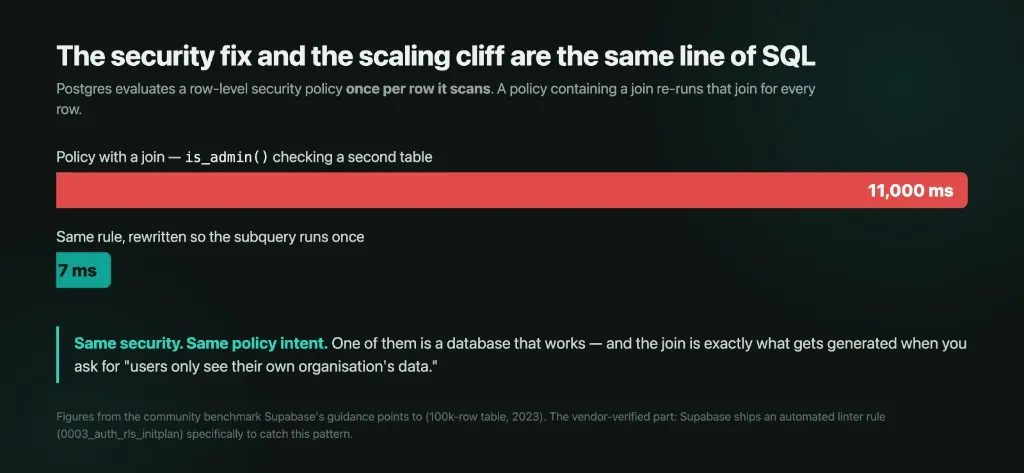
Postgres evaluates a security policy once per row it scans. So a policy that contains a join re-runs that join for every single row.
And a join is exactly what you get when you express the rule you actually want. "Users can only see their own organisation's data" is not a simple comparison — it's a lookup into a memberships table. Ask an AI for org-scoped access and that's what it writes.
In the benchmark this field keeps citing, a policy with a join took 11 seconds. Rewritten so the subquery evaluates once instead of per row, the same rule took 7 milliseconds. Same security, same intent, one of them is a database that works.
The strongest evidence here isn't the benchmark, though — it's that Supabase ships an automated linter rule specifically to catch this pattern. Vendors don't build detection for problems nobody has.
Two ceilings underneath that
Connections. Vercel functions auto-scale to tens of thousands of concurrent executions. A default paid-tier Supabase instance accepts 60 direct connections. A frontend that opens a connection per invocation exhausts that at around sixty simultaneous requests — comfortably inside a modest traffic spike.
Disk throughput, which is the one nobody sees coming. That same default tier gives you 500 baseline IOPS with a burst allowance. A missing index turns cache hits into disk reads; the instance bursts and masks it for days or weeks; then the burst credits deplete and latency collapses to the floor. Nothing in your query metrics changed. This is the "it was fine yesterday" failure.
Question 3: Can you still change it safely — and would you know if you couldn't?
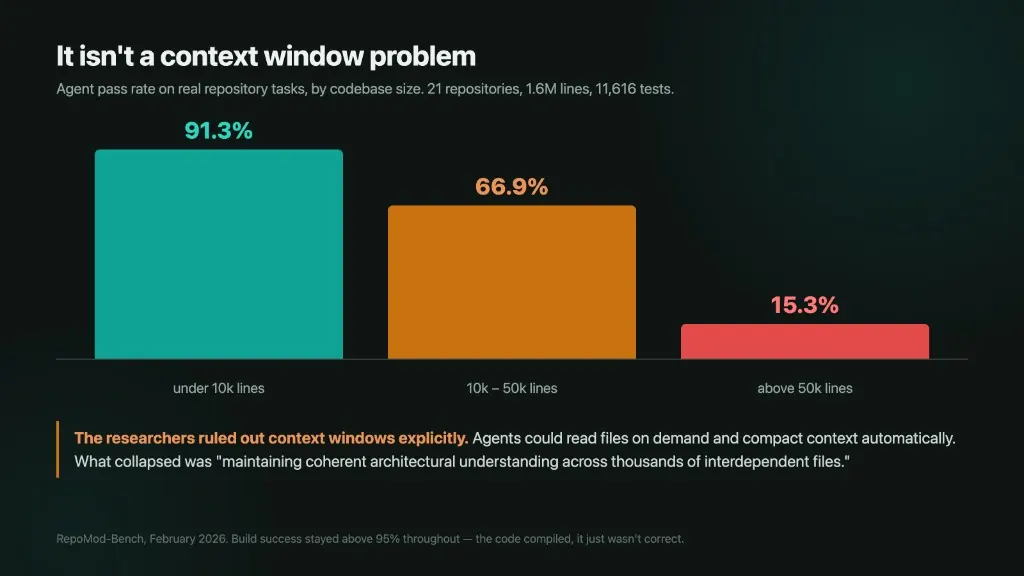
A 2026 benchmark ran coding agents against 21 real repositories — 1.6 million lines, 11,616 tests. Pass rates by codebase size: 91.3% under ten thousand lines. 15.3% above fifty thousand.
The obvious explanation is the context window, and the researchers tested it explicitly. It's wrong. In their words, the collapse "persists despite the fact that modern coding agents can read files on demand and manage arbitrarily large codebases through automatic context compaction. The challenge therefore lies not in fitting code into context, but in maintaining coherent architectural understanding across thousands of interdependent files."
The model can hold the files. It can't hold the architecture.
Five independent research groups using different task types land on the same shape, which is the part that makes it credible. And a separate study of over nine thousand agent runs found something sharper: on simple tasks that no agent ever solved, the agents found the correct file every time and edited it almost every time. The failure wasn't locating the code. It was knowing what else the change was responsible for.
Why your tests won't tell you
Half of agent-written pull requests that modify tested code add no tests at all. In Python, nearly two-thirds have no changed line executed by any test. Error handling is worst — try/catch blocks are missed over 80% of the time.
So agents ship into a coverage vacuum, which is why "the tests pass" carries so little information. Three separate studies converge on a fifth to a third of accepted patches changing behaviour beyond what was intended.
And the vulnerability data says the same thing from another direction. In a controlled replay, 40% of fixed vulnerabilities came back. A better model barely helped — down to 33%. A more detailed, professional-sounding prompt made it worse. And in 32% of runs, the agent recognised the risk and shipped it anyway, sometimes leaving a warning comment instead of a fix.
The researchers' conclusion is the one line I'd want every founder to read: these limitations "are structural and cannot be fully resolved by model scaling or prompt engineering alone."
What this doesn't mean
Not every big number here is an argument against building this way, and I want to be careful not to imply otherwise.
The largest commit-level study of AI-authored code found it fixed more code smells than it introduced. A study now accepted to IEEE Transactions on Software Engineering found code churn fell after teams adopted generative AI. Another found AI-written code carried lower duplication than human-written code. Salesforce measures cross-file consistency in agents at 0.93–0.98 and calls it a mature capability. None of that supports a simple "AI code is worse" story, and the honest version of this post has to say so.
There's a good counter-anecdote too. A founder spent $607 in three and a half days on Replit, projecting to roughly $8,000 a month on a $25 plan. He didn't ask for a refund. He judged it worth it against $50,000–150,000 and three to six months of engineering time — and on those numbers he's probably right.
The three questions aren't reasons not to scale. They're the three things that are cheap to check now and expensive to discover later.
What I'd actually do this week
- Work out your cost per active user, then find your 95th percentile rather than your mean. If you can't calculate it, that's the finding.
- Set a hard spend cap at your model provider today. It takes two minutes and it's the only real circuit breaker you have.
- Open your Supabase advisors and look for policies containing joins or function calls, and for tables missing indexes on the columns those policies filter on.
- Count the lines in your repo. Not because a number is a verdict, but because 10k and 50k are where the measured cliffs are, and knowing which side you're on changes how much review each change deserves.
- Pick one endpoint you changed recently and check whether any test executes it. If nothing does, you now know what "the tests pass" has been telling you.
Those five checks take an afternoon. The production-readiness audit we run covers the rest of the stack they sit on — spend ceilings, RLS policy shape, connection pooling, and whether the last month of agent changes is actually covered. Get the 25-Point Vibe-Code Production Checklist (PDF) → (free, sent to your email)
A note on the numbers
Several widely-quoted figures in this space don't survive checking and I've left them out: a cluster of "$23,000 Vercel bill" stories dated 2026 that are actually a re-dated February 2024 incident, a "$87,500 fraud" case that traces to a security vendor's own marketing page, and a set of routing and caching savings percentages published by companies selling routing and caching.
I'd also flag one genuine gap rather than paper over it. There is no verified 2026 benchmark for AI application gross margins. The most-cited figures — 50–60% for AI companies against 60–80% for traditional SaaS — come from a 2020 analysis, and predate the modern inference market entirely. The per-user economics in this post are my arithmetic on published token prices under stated assumptions, not observed company data. Replace my usage assumptions with your own telemetry and the shape holds; the specific dollars won't.
FAQ
No. Modelled at 150 model calls per user per month, inference is 72 to 99 percent of the bill, and it is charged per use. Cost per user stays flat — $14.35 at 10,000 users and $14.36 at 100,000. The blended margin also hides power users: the heaviest 5% can run at negative 198% while the average still looks like 73%.
Three of the four documented runaway bills in 2026 involved zero or near-zero users. The mechanism is a loop in agent-written code — a Durable Object alarm calling itself, an uncapped model binding, a config change described as a cost saving. Hosting dashboards often monitor the wrong metric, and the hard ceiling that actually stops spend sits at the model provider, not at Vercel or Firebase.
It can, if the policy contains a join or an unwrapped function call. Postgres evaluates an RLS policy once per row it scans, so a join re-runs for every row. In the community benchmark this field cites, that pattern took 11,000 ms; rewritten so the subquery runs once, the same rule took 7 ms. Supabase ships linter rule 0003_auth_rls_initplan specifically to catch it.
RepoMod-Bench measured pass rates of 91.3% under 10,000 lines, 66.9% between 10,000 and 50,000, and 15.3% above 50,000. Researchers ruled out context windows — agents could read files on demand. What collapsed was architectural understanding across thousands of interdependent files. Tests passing is a weak signal: half of agent pull requests that modify tested code add no tests at all.
Sources
- Supabase — Performance and Security Advisors — linter rule 0003_auth_rls_initplan
- Supabase — Auth RLS InitPlan
- Supabase — Compute and Disk — 60 direct connections and 500 baseline IOPS on Micro
- Supabase pricing
- RepoMod-Bench: A Benchmark for Code Repository Modernization — arXiv 2602.22518 — 21 repositories, 1.6M lines, February 2026
- Deng, Fan & Meng, Understanding the (In)Security of Vibe-Coded Applications — arXiv 2606.23130 — 200 audited deployed vibe-coded apps
- Test Coverage Analysis of Agentic Pull Requests — arXiv 2607.18057 — 4,882 agent-created pull requests
- Vercel — Spend Management
- Vercel — Functions concurrency scaling
- OpenAI — Spend limits
- Anthropic — Set spend limit
- Published pricing: Anthropic, OpenAI, Google — token prices used for the per-user arithmetic, September 2026
- Firebase — Avoid surprise bills — budgets "do not cap your usage or charges"
- Durable Object alarm loop: $34k in 8 days, zero users, no platform warning — Hacker News first-person incident report
- Cloudflare AI Gateway — spend limits on the safer product coding agents tend not to reach for